
Dark Web breach notifications
When Dark Web Monitoring finds one of a client’s users in a new password breach, who should hear about it? The product lets you pick two audiences independently — your designated security contacts (people who should know about security events for that client) and the affected user themselves. You set partner-wide defaults once; each client can override them.
Security contacts vs. INFIMA admins
Section titled “Security contacts vs. INFIMA admins”A common source of confusion: “security contacts” here are not the same as the admins you’ve added under People → Admins for the client (and they’re not the same as your partner-level admin team either). Security contacts are simply email addresses you’ve added to the breach notification recipient list. They may or may not have INFIMA login accounts — that’s irrelevant for the purpose of this feature. The only thing that matters is the email address.
- Partner-level security contacts — set under Settings → Dark Web Monitoring. CC’d on every breach alert across all your clients.
- Client-level security contacts — set under each client’s Tailor → Dark Web Monitoring. CC’d on every breach alert for that one client only, on top of the partner-level list.
The two lists are additive. A new breach hit produces one email; both lists are on the recipient line.
Set the partner-wide defaults
Section titled “Set the partner-wide defaults”Open the partner menu → Settings → Dark Web Monitoring → Dark Web Breach Notifications.
- Alert security contacts — the master switch. Off here means no breach emails go to anyone at any client, regardless of per-client settings.
- Also notify the affected user — when on, the user themselves receives a copy of the alert with a CTA to resolve the exposure. When off, only the security contacts receive the email.
- Partner-level security contacts — the email list that’s CC’d on every breach alert across all clients. Add yourself plus anyone on your team who should hear about every client’s hits.
Override per client
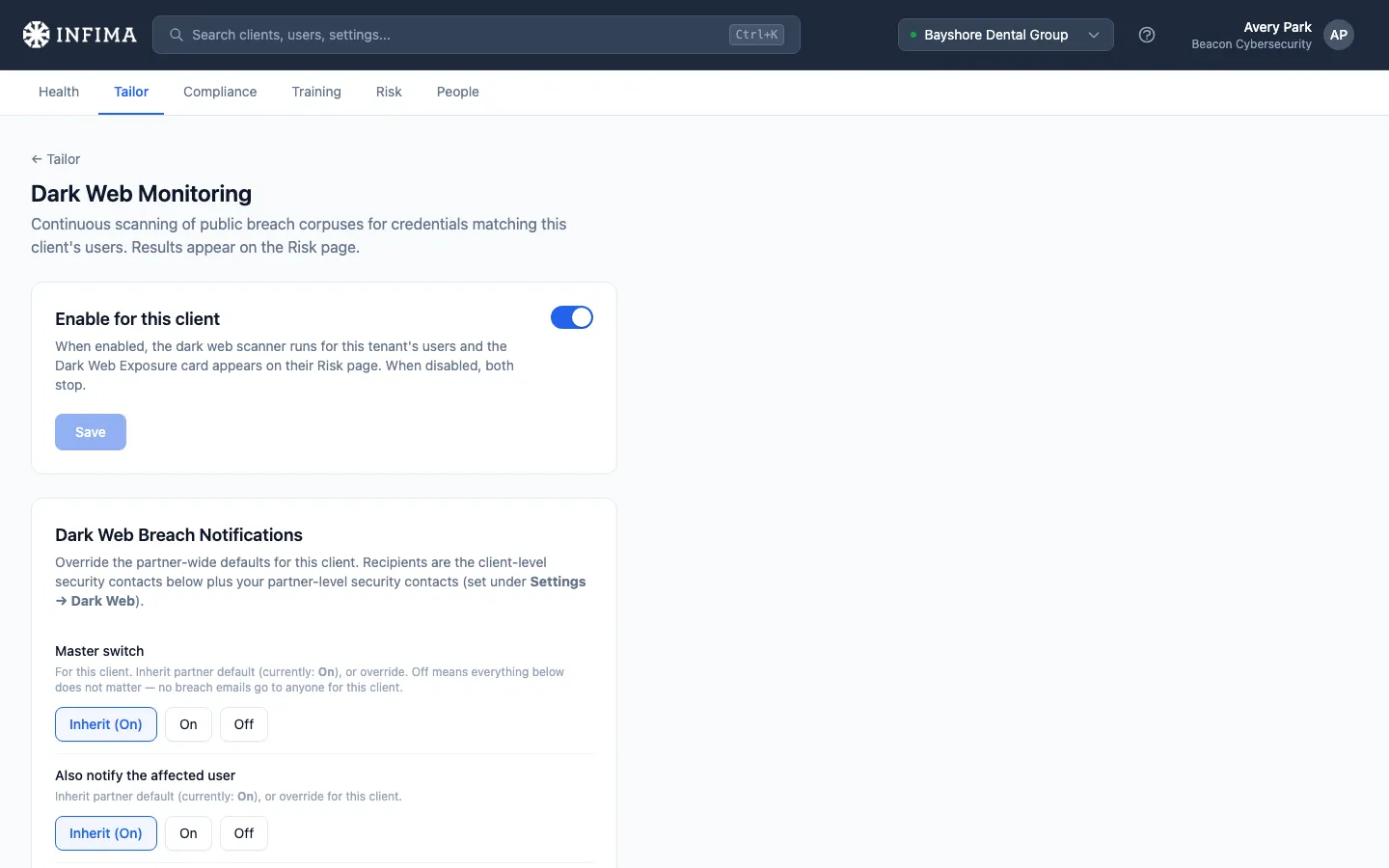
Section titled “Override per client”Open the client → Tailor → Dark Web Monitoring → Dark Web Breach Notifications.
Both toggles are tri-state: Inherit (follow the partner default), On, or Off. Inherit means “keep following the partner default, whatever it is now and whatever it changes to later.” On / Off pin the value for this client.
- Use Inherit by default. Clients you don’t touch quietly follow whatever you change at the partner level later.
- Use On or Off when a specific client has different requirements — e.g., a customer who insists their users shouldn’t receive breach emails directly, even though every other client does.
The Client-level security contacts list lets you add per-client recipients on top of the partner-level list. Use this when:
- The client has their own internal IT, security, or compliance contact who should be CC’d alongside your team.
- A specific stakeholder (the client’s CFO, head of compliance, vCIO) wants visibility into breach hits for that client only.
There’s no way to replace the partner list for a single client — the recipient list is always the union of both. If you want a client’s contacts to receive notifications instead of your team, remove yourself from the partner-level list.
Custom sender (optional)
Section titled “Custom sender (optional)”By default we send breach notifications under your partner branding. The per-client config has a Customize sending name and email expander — set a custom Sending Name / Sending Email to override. Useful when the customer wants notifications to look like they’re from their internal security team rather than yours.
What the email looks like
Section titled “What the email looks like”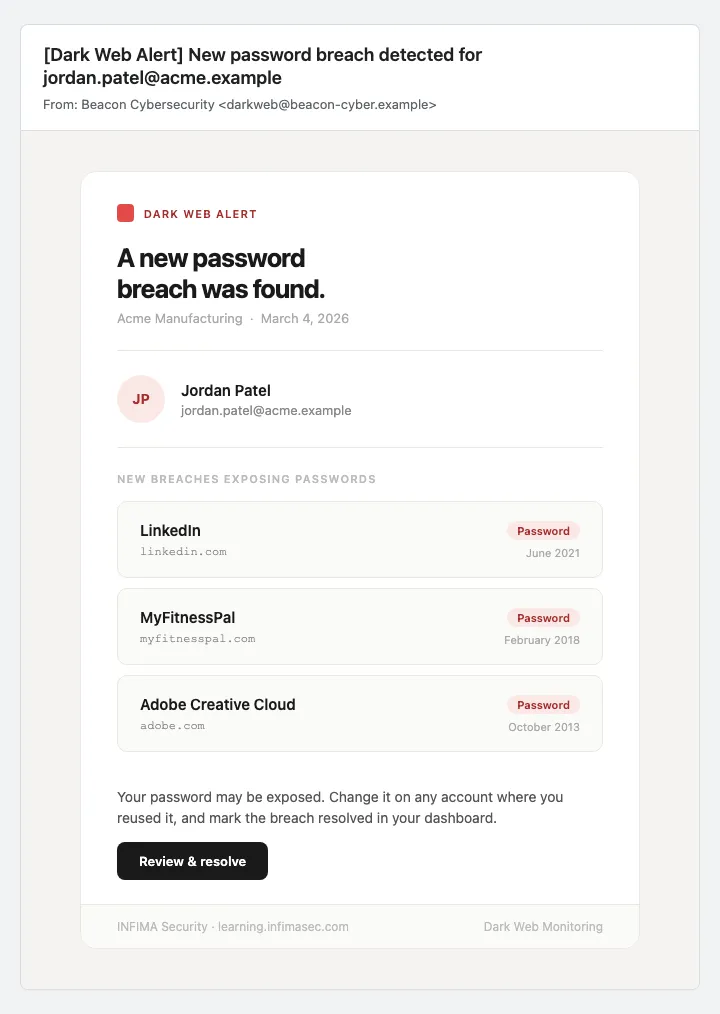
The email names the affected user and lists each new breach (name, domain, date). When the affected user is themselves a recipient, a Review & resolve button takes them straight to the Learning Portal where they can change exposed passwords. Security-contact-only recipients see the same content without the CTA.
You’ll know it worked when
Section titled “You’ll know it worked when”- The toggles save with your chosen states and the chip stops showing Inherit on the fields you set explicitly.
- The security contact list shows the addresses you added.
- The next password breach hit for a user at this client produces an email matching your configuration — your security contacts receive it, the user receives it if you said yes, sender matches your override if set.
Frequently asked
Section titled “Frequently asked”Wait — “security contacts” aren’t the same as my admins? No. Security contacts here are just email addresses on a CC list — they’re scoped specifically to breach notifications. The admins under People → Admins are people with sign-in access to the dashboard. Some overlap is fine (you can put an admin’s email in the security contacts list) but they’re separate concepts. A security contact doesn’t need an INFIMA account.
A client said their user got a breach notification but the user didn’t know we were monitoring them. What do I do? The notification is informational — it tells the user their credentials appeared in a known breach. The user being unaware they were enrolled usually means the welcome email wasn’t sent or wasn’t read. Confirm the user’s onboarding flow ran for them, and reach out to confirm the legitimacy of your brand on their behalf.
Can I customize the body of the breach notification email? Not from this page today. The template is standard. Contact our support team if your client has specific wording requirements.
Inherit vs On vs Off — what’s the difference between Inherit and explicitly setting it the same way? Inherit means “follow the partner default, whatever it is now and whatever it changes to later.” On or Off pins the value for this client — partner-level changes don’t affect them. Use Inherit unless you have a specific reason this client should not follow the partner default going forward.
The client-level security contacts CC alongside the partner-level addresses — is there a way to replace the partner list instead? No. The recipient list is the union. If you want the client’s contacts to receive notifications instead of your team, that’s a partner-side decision: remove yourself from the partner-level list and add the client’s addresses to the client-level list.
A user keeps showing up in new breaches — am I going to spam their inbox? Each new breach generates a notification; we don’t re-notify for the same breach. If a user is in many breaches over time, they’ll receive multiple notifications — that’s the design, since each one is an opportunity to rotate the affected password.
Why don’t I get notifications for the info-tier or PII-only breaches I see in the dashboard? Breach notifications fire only for password breaches — the high-severity tier where credentials are at risk. Lower-tier hits (info / PII) still appear in the dashboard and on the user’s breach detail page so security contacts can see the full exposure picture, but they don’t trigger an email. If you want a broader notification scope, contact our support team.
Can I send the notification immediately after a breach is added, or is there a delay? Notifications fire when our scan identifies the hit. Once a hit is identified, the notification goes out promptly.
Related
Section titled “Related”- Enable Dark Web Monitoring — the master enable toggle that gates everything on this page.
- Branding defaults and per-client overrides — the source the default sender pulls from.
- Partner-level settings — set your default breach notification behavior at Settings → Dark Web Monitoring so new clients inherit it.
- Tailor to your client — breach notifications are a Tailor configuration.