
Enable Dark Web Monitoring
Dark Web Monitoring checks the client’s users against known credential breaches and alerts you when there’s a hit. When enabled, breach exposure shows up on the client’s Risk page and feeds the Dark Web Monitoring report. When disabled, both stop.
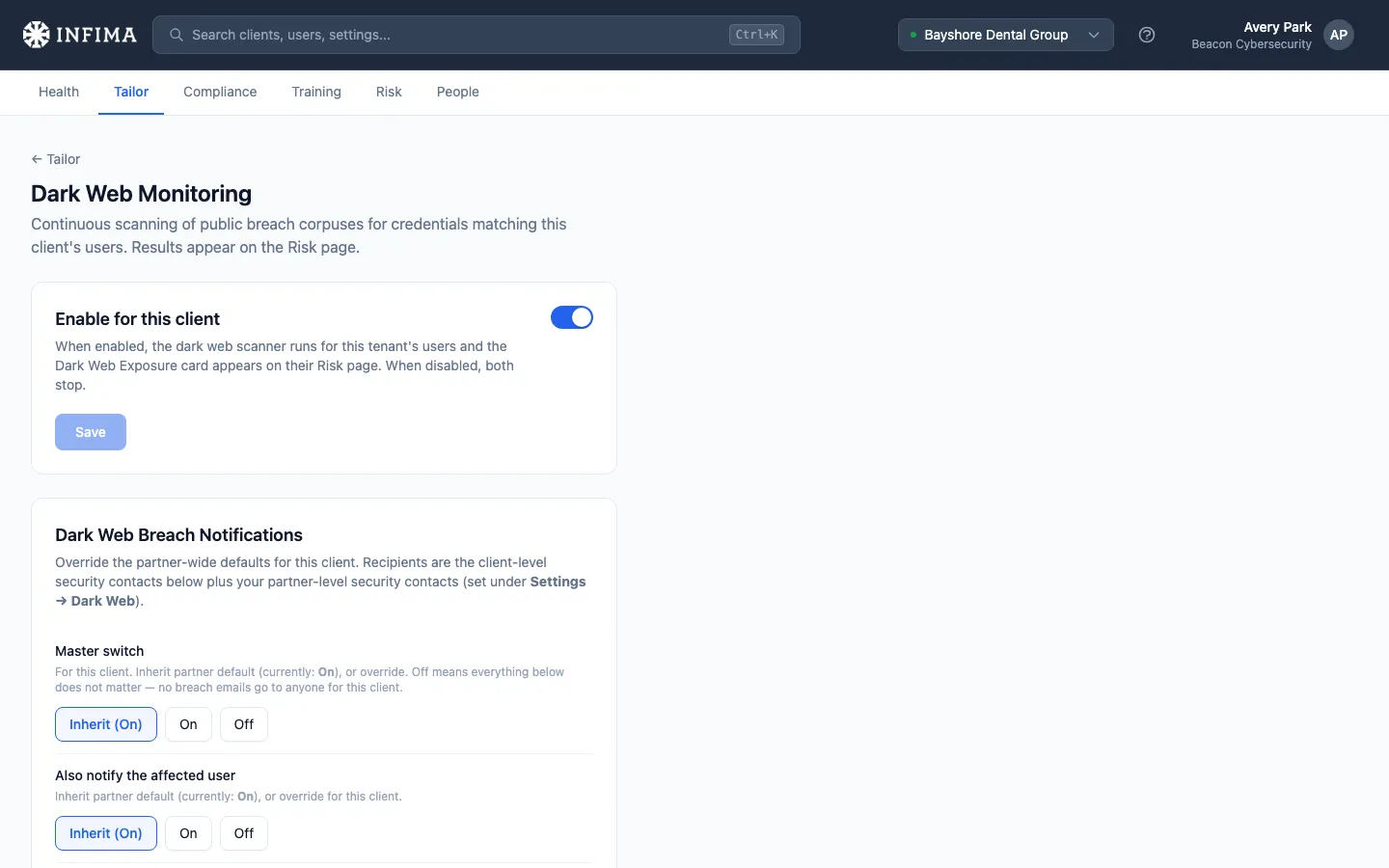
Enable for a client
Section titled “Enable for a client”Open the client → Tailor → Dark Web Monitoring. Toggle Enable for this client on. Save.
That’s it. Going forward, any breach hits against this client’s users appear on the Risk page in the Dark Web Exposure card.
The partner master switch
Section titled “The partner master switch”Above the per-client toggle is a partner-wide gate. When that’s off, every client’s per-client toggle is disabled and grayed out, and a warning banner appears on this page:
Disabled for the entire organization. Dark Web Monitoring is turned off across all of your clients. A partner admin can re-enable it from Billing → Add-ons.
This is how Dark Web Monitoring is sold — as a partner-level add-on. If you don’t see the option enabled, that’s your billing setup, not the client’s setting. A partner admin (on your side) re-enables it from Billing.
You’ll know it worked when
Section titled “You’ll know it worked when”- The page shows Enable for this client as on and the warning banner about the org-wide gate is absent.
- The client’s Risk page renders a Dark Web Exposure card (it may show no hits yet — that’s the empty state, not a misconfiguration).
- Future breach scans surface new hits on the same card.
Resolved vs. unresolved
Section titled “Resolved vs. unresolved”Every breach hit carries a status, and it’s the one thing to read when you’re triaging a client’s exposure:
- Unresolved — we found a breached password for the user and the fix hasn’t been confirmed yet. This is the only state that needs attention.
- Resolved — the user changed the exposed password and marked the action complete in the Learning Portal. The risk from that specific exposure is addressed.
A few things worth knowing so you can advise a client confidently:
- Resolution is confirmed by the user. A hit moves to resolved when the affected user rotates the password and marks it done in the portal. Describe it to a client as “the user confirmed they fixed it” — it reflects the user’s own action.
- Each exposure is tracked on its own. A new breach involving the same user creates a new exposure to resolve; clearing one doesn’t suppress future hits. A user who shows up in several breaches over time will have several exposures, each its own opportunity to rotate the affected password.
- You can resolve on a user’s behalf. Open the user from the Risk page and use the resolve action there. Resolved hits stay in history so the trail is intact, but stop counting against the user’s active exposure.
Frequently asked
Section titled “Frequently asked”A client says they’re seeing breach hits — is that bad? The hit means the user’s credentials appeared in a known credential breach, somewhere. It’s not an active attack; it’s an indicator that the user should rotate their password (and any other accounts using the same password). The point of monitoring is to surface these so the client can act.
Will users be notified when they’re in a breach? That’s a separate setting. See Breach notifications — you can configure who gets emailed (administrators, the user themselves, or both).
Does scanning cost extra per user? Pricing is handled at the partner level — see your Billing page for the add-on details. The per-client toggle here just gates whether scanning runs; billing math happens upstream.
A client doesn’t want Dark Web Monitoring — they have their own EDR/IDP solution. Leave the per-client toggle off. We won’t scan the client’s users; nothing surfaces on the Risk page; the report isn’t generated for them. The rest of training and phishing continues normally.
Where do breach hits go besides the Risk page? The Dark Web Monitoring report is one of the standard report types you can include in Scheduled reports or build into a custom schedule. For real-time email-out behavior, configure Breach notifications.
A user was in a breach last year but rotated their password — how do I clear it? The user can mark it resolved themselves from the Learning Portal once they’ve rotated the affected password, or you can resolve it on their behalf from the Risk page. See Resolved vs. unresolved above for how the status behaves.
Does turning this on create a queue of work for my team? No. When we find a breached password, we notify the affected user directly with the steps to fix it, and they resolve it themselves in the Learning Portal. Your role is oversight — watch the Risk page for trends, repeat exposures, and anything left unresolved, and lean on per-user risk scoring to prioritize. You can optionally CC your team on the alerts (see Breach notifications), but there’s no queue to work.
Related
Section titled “Related”- Breach notifications — when a hit happens, who gets emailed and what they’re told.
- Explaining Dark Web Monitoring to clients — a leave-behind PDF and talking points for the client conversation.
- Scheduled reports — include the Dark Web Monitoring report in the monthly bundle.
- Tailor to your client — Dark Web Monitoring is a Tailor configuration.