
Phishing experiments
The phishing rotation runs automatically — we pick the templates, the users, and the timing. But sometimes you have a pointed question the rotation can’t answer on your schedule: how would the finance team hold up against a wire-fraud pretext? Did last quarter’s training actually move a department’s click rate? A phishing experiment is the tool for that question — a deliberate, bounded exercise with one template, a cohort you choose, and a fixed send window, tracked in its own results funnel with a client-ready report at the end.
Experiments run alongside the rotation, not instead of it. Routine phishing tests keep going out automatically, and by default an experiment’s results stay isolated from the client’s standard risk metrics — so a deliberately hard test doesn’t distort the trend lines you and the client watch month to month.
You’ll need
Section titled “You’ll need”- A template. Any template enabled for the client works, including a custom one — there’s a shortcut to create a custom template right in the form.
- A cohort in mind. Either specific users you’ll pick by hand, or an attribute rule (groups, collections, languages).
- A send window. A start and end; sends are spread across it or fired in one burst.
Create the experiment
Section titled “Create the experiment”-
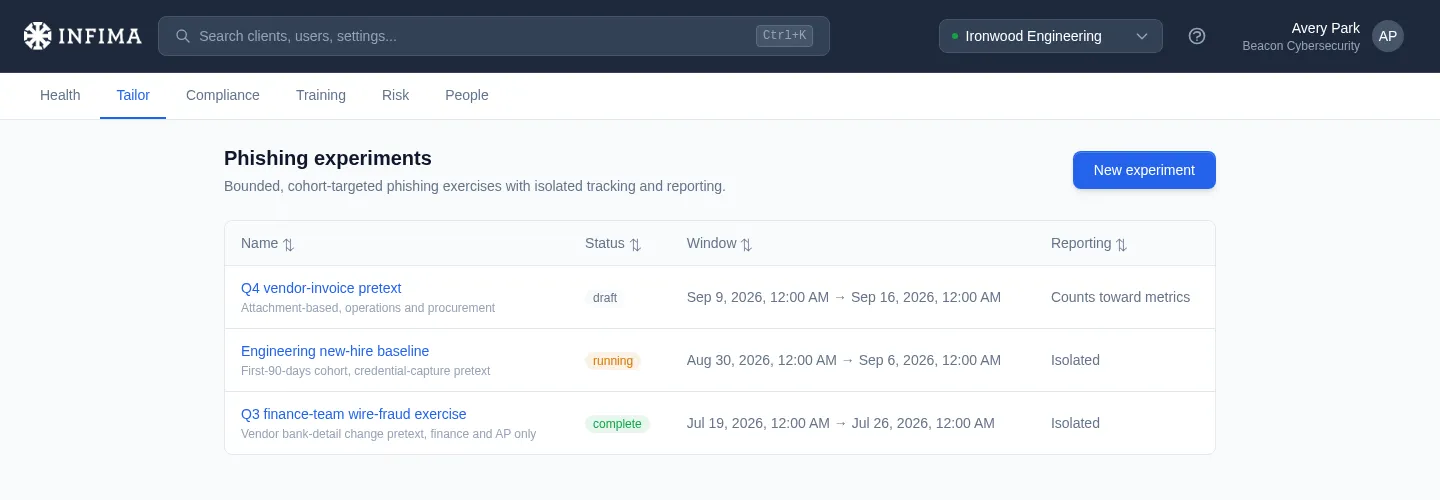
Open the client → Tailor → Phishing and scroll to the Experiments section, then Phishing Experiments → New experiment.
-
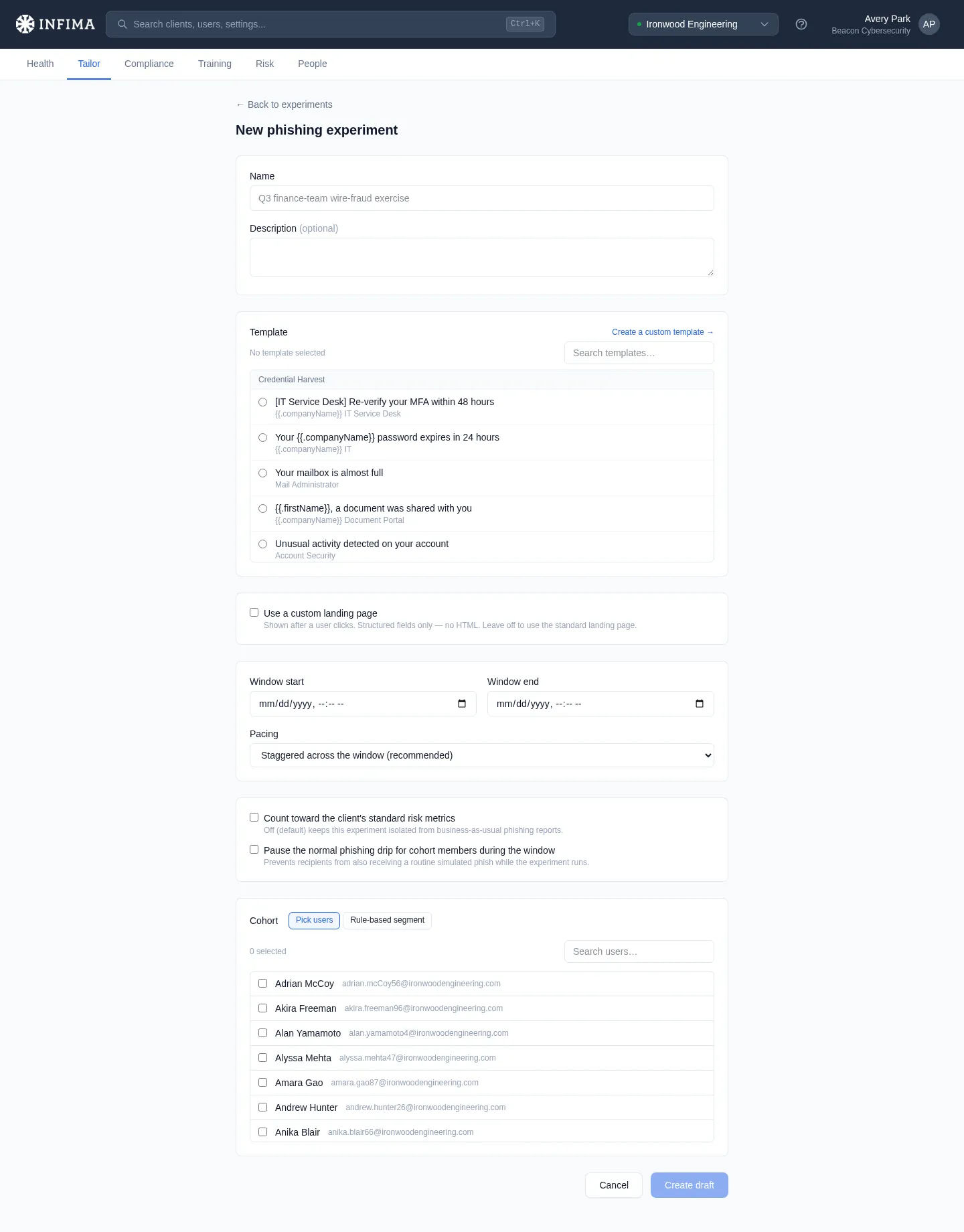
Name it — something you’ll recognize in the list later, like Q3 finance-team wire-fraud exercise — and add an optional description.
-
Pick the template. The picker shows the templates enabled for this client. Use Create a custom template if the pretext you want doesn’t exist yet.
-
Optionally add a custom landing page. This is what a user sees after they click: a headline, body text, an optional logo, and either a login form or a button with your own text and link. If you use the login form, we record that credentials were submitted — never the credentials themselves.
-
Set the window and pacing. Choose the start and end, then pick Staggered across the window (recommended — sends spread out so they don’t arrive as an obvious wave) or Single burst at window start.
-
Choose the isolation options. Two checkboxes: whether the experiment counts toward the client’s standard risk metrics (off by default — isolated), and whether to pause routine phishing tests for cohort members during the window so nobody gets a routine test on top of the exercise.
-
Build the cohort. Pick users gives you a searchable checklist. Rule-based segment selects by attributes instead: groups, collections, and languages — within a list it’s any of these, across lists it’s all conditions apply.
-
Create draft. Drafts are fully editable — nothing sends until you launch.
Launch it
Section titled “Launch it”-
Open the experiment from the list and give the draft a final review — template, window, cohort count.
-
Click Launch and confirm. Every cohort member is scheduled across the window (or queued for the burst). If the cohort came from a rule, the rule is re-resolved at launch, so users who newly match — a recent hire in a selected group, say — are included.
-
Done editing. Once launched, the experiment can no longer be edited or deleted. It shows running until the window closes, then flips to complete on its own.
Read the results
Section titled “Read the results”The experiment page tracks the exercise live and keeps the final record afterward:
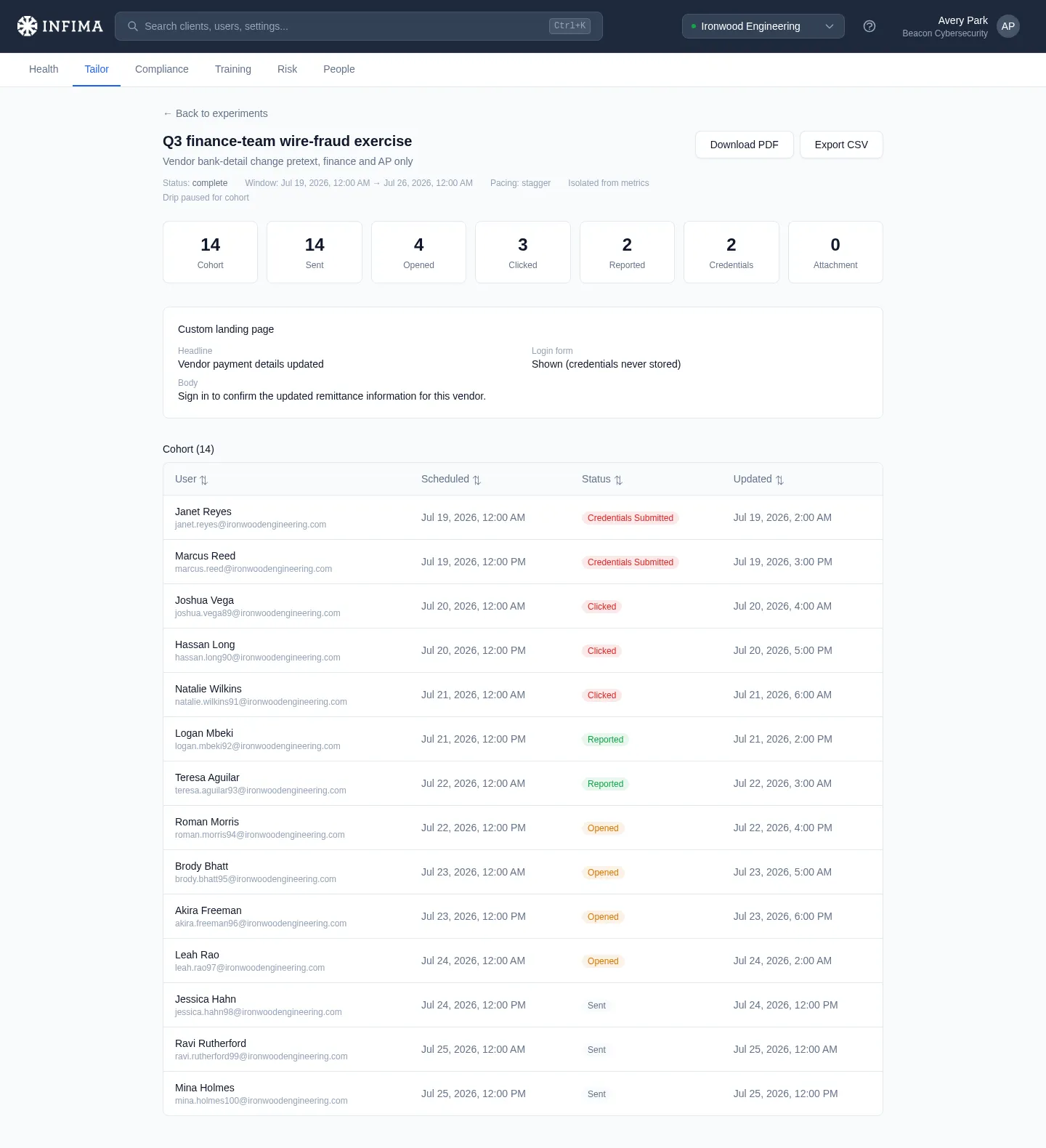
- The funnel — tiles for Cohort, Sent, Opened, Clicked, Reported, Credentials, and Attachment, so you can see at a glance how far users got.
- The cohort table — every member with their individual outcome and when it happened.
- Download PDF — a client-ready summary of the exercise, useful for the review meeting the experiment was probably run for.
- Export CSV — the raw per-user rows if you want to slice them yourself.
You’ll know it worked when
Section titled “You’ll know it worked when”- After launch the experiment shows running, and cohort rows move from Queued to sent-and-beyond as the window progresses.
- The funnel tiles climb as users open, click, or report.
- When the window ends the status flips to complete and the funnel, PDF, and CSV reflect the final numbers.
Frequently asked
Section titled “Frequently asked”Will an experiment skew the client’s risk score or phishing reports? Not unless you ask it to. By default an experiment is isolated — its results don’t feed the standard metrics, and the experiments list marks it Isolated. Tick count toward the client’s standard risk metrics at creation if you want the results included, for instance when the exercise is meant to be part of the normal testing record.
Do cohort members still get routine phishing tests during the window? Yes, unless you check the pause option when creating the experiment — then members of the cohort are skipped by the rotation while the window is open and resume automatically after it closes. Everyone outside the cohort is unaffected either way.
A user failed the experiment phish — do they get the usual follow-up? Yes. For the user, failing an experiment test works like failing any other: the day-after follow-up email, behavior-based remediation if the template is behavior-tagged, and a tracked assignment if mandatory behavior training is on. Isolation affects the client’s metrics, not the user’s coaching.
Can I change an experiment after launching it? No. Edit and delete are available only while it’s a draft — launching locks it. If something’s wrong mid-window, contact our support team; otherwise let it complete and run a corrected experiment.
Who exactly is in a rule-based cohort? The rule resolves to concrete users twice: once when you create the draft (so you can sanity-check the count) and again at launch. Between those two moments the cohort can shift as users join or leave the matching groups — that’s by design, so the exercise reaches everyone who matches on launch day. After launch the member list is fixed.
How is this different from just enabling the template for the client? Enabling a template adds it to the automatic rotation — we decide who gets it and when, spread over time. An experiment is the opposite trade: you decide the exact audience and the exact window, and you get an isolated, self-contained measurement instead of a contribution to the ongoing record.
What happens to credentials typed into the experiment’s login form? We record the fact that credentials were submitted and nothing else. The username and password are never stored — same as every phishing test we send.
Related
Section titled “Related”- Phishing templates — the template catalog experiments draw from.
- Behavior-based remediation — the coaching flow that picks up users who fail a tagged experiment test.
- Read phishing activity — the client’s ongoing phishing record, which isolated experiments deliberately stay out of.