
Publish a policy for users to acknowledge or sign
Your client has a written policy — an acceptable use policy, a remote-work agreement, a BYOD policy — and they need their people to actually read it and confirm they’ve done so. Later, during an audit or an incident, they need proof of who agreed and when. This page is where you publish that policy to a client’s users, decide how they confirm it, and watch completion come in.
You’ll need
Section titled “You’ll need”- The policy as a PDF.
- A decision on how users confirm it: a simple acknowledgment (one click) or a signature (they type their full name).
- A sense of who it applies to — everyone at the client, one group, or a specific collection.
- How often it should be renewed (yearly is the default).
Publish a policy
Section titled “Publish a policy”-
Open the client and go to Training → Policies.
-
Choose the audience at the top — the whole client, a group, or a collection. What you upload next applies to whoever you’ve selected here.
-
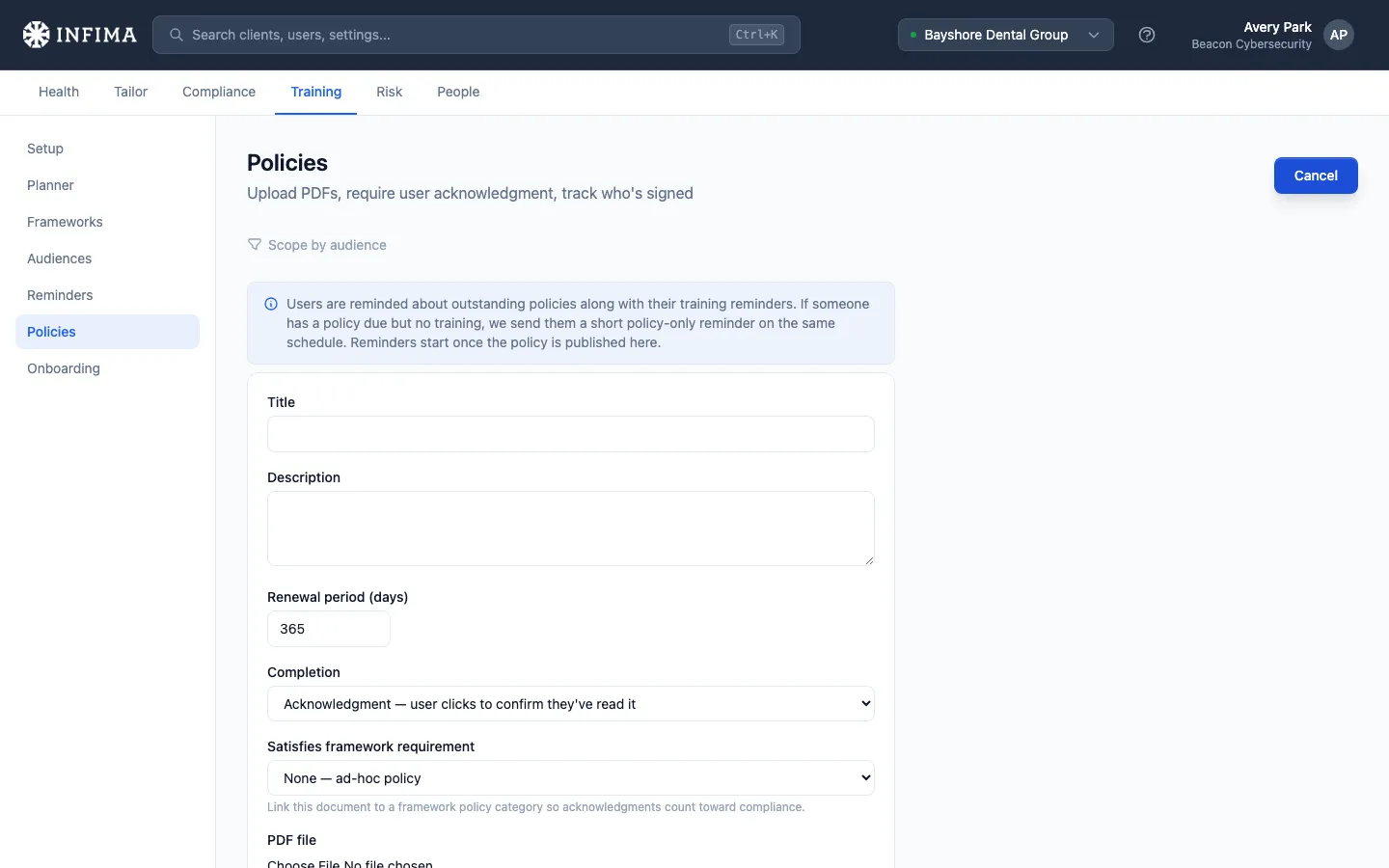
Click Upload policy and fill in the form:
- Title and Description — what your users will see.
- Renewal period — how many days a confirmation stays valid before we ask the user to confirm again. Defaults to 365. Enter 0 if the policy should never renew — users confirm it once and aren’t asked again until you publish a new version of it. The maximum is 3650 days (10 years).
- Completion — Acknowledgment (the user clicks to confirm they’ve read it) or Signature (the user types their full name to sign).
- Satisfies framework requirement (optional) — link the policy to a policy category so completions count toward that framework’s compliance. Leave it on None for an ad-hoc policy.
- PDF file — the document itself.
-
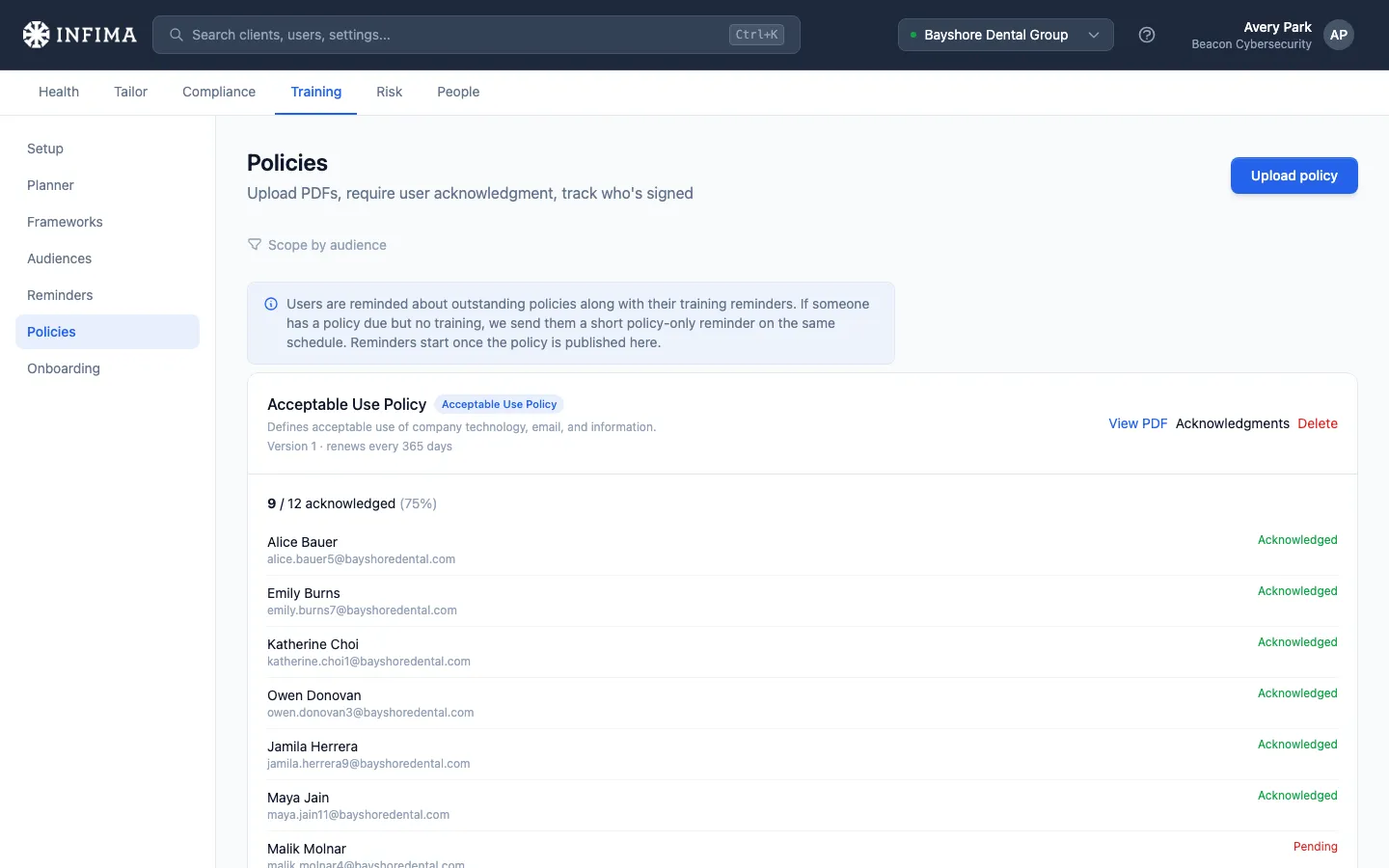
Click Upload. The policy appears in the list right away, showing its version and renewal period.
You’ll know it worked when
Section titled “You’ll know it worked when”- The policy shows in the list with its title, version, and “renews every N days” — or “does not renew” if you set the renewal period to 0.
- A Signature policy carries a Signature tag; a framework-linked policy carries the category name.
- Expanding the policy shows a per-user breakdown — who’s completed it and who’s still pending — with an “X / N acknowledged” summary.
Frequently asked
Section titled “Frequently asked”What’s the difference between acknowledgment and signature? Acknowledgment is a single “I have read and acknowledge this” click. Signature asks the user to type their full name, which is stored as their signature — a stronger, named attestation. A signature policy can’t be satisfied by a bare click. For signature policies, the completion breakdown shows the name each person signed with.
How do users actually complete it? When a user signs in to their learning portal, a Policies area lists what they owe. They open the document, read to the bottom, and then acknowledge or sign. The Policies area only appears for users who actually have a policy assigned, so clients with none never see it.
When do users get reminded? Outstanding policies are included in the training reminders your users already receive. If someone has a policy due but no training due, we send them a short policy-only reminder on the same schedule. See How policy reminders reach your users.
What does “Satisfies framework requirement” do? Some frameworks call for specific written policies. Linking a policy to the matching category means user completions count toward that requirement on the client’s compliance view — instead of it showing as an outstanding item. Leave it unset for policies that aren’t tied to a framework.
Can I target only some users? Yes — set the audience before uploading. A policy scoped to a group or collection is only shown to, and only tracked against, the users in that audience.
What happens when I need to update the policy? Click Upload new version on the policy and pick the revised PDF. The policy keeps its title, audience, renewal period, completion mode and framework link, and its version number goes up by one. A new version means the document has changed, so previous confirmations no longer count: everyone in the audience is asked to confirm the new version, and it re-enters their reminders. Confirmations of earlier versions stay on record — expand Acknowledgments and look under Earlier versions to see who confirmed each one and when, or to open that version’s PDF.
Does the same document renew automatically? Confirmations are valid for the renewal period you set. Once that window passes, the policy becomes due again for that user and re-enters their reminders — no action needed from you.
Do policies show up in reporting? Yes. The client’s compliance report includes a policy section with each policy’s completion standing and an overall rate.
How do I remove a policy? Delete it from the list. Users are no longer asked to confirm it, and it drops off their Policies area. Deleting also removes its confirmation history, earlier versions included, from the dashboard and reports — so when the document has merely changed, use Upload new version instead.
Related
Section titled “Related”- How policy reminders reach your users — what your users see and when we nudge them.
- Share a direct link to a policy or course — hand the client a link that opens one policy after sign-in.
- Training reminders — the reminder emails policies ride along with.
- Audiences — how groups and collections scope who a policy applies to.