
Put the learning portal on your own domain
Your logo is on the emails and the portal already, but the address bar still says learning.infimasec.com — and a client’s users may have no idea who that is. You’d rather they open training.yourcompany.com and see nothing but your brand. Set a hostname once at the partner level and every client’s users get it; give a client their own hostname where they want the portal to look like theirs.
You’ll need
Section titled “You’ll need”- A hostname under a domain you (or the client) control, such as
training.yourcompany.com. It has to be a subdomain — a bare domain likeyourcompany.comcan’t be used. - Access to that domain’s DNS to add one CNAME record. If the client is supplying the hostname, they’ll add the record on their side.
- A few minutes after the record is added for the domain to come live.
Set your partner-wide hostname
Section titled “Set your partner-wide hostname”-
Open Settings → Whitelabel & Branding and find the Learning Portal Domain card.
-
Type the hostname — just the name, no
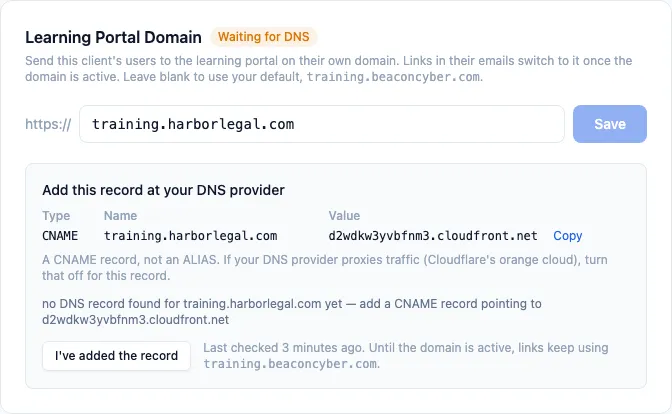
https://— and click Save.The card switches to Waiting for DNS and shows the record to add.
-
Add the CNAME record at your DNS provider. Copy the value from the card:
Type Name Value CNAME training.yourcompany.comthe value shown on the card It must be a CNAME, not an ALIAS or “flattened” record. If your DNS provider proxies traffic (Cloudflare’s orange cloud, for example), turn that off for this record.
-
Click “I’ve added the record.” We look the record up straight away. Until it’s in place the card tells you what we found instead, so you can see whether the record has propagated yet.
-
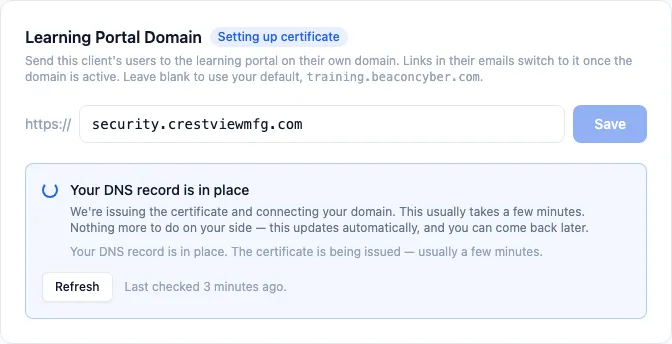
Wait for the certificate. Once the record is right the card changes to Setting up certificate. There’s nothing left for you to do at this point — we issue the certificate and connect the domain, and the card updates on its own. This usually takes a few minutes.
-
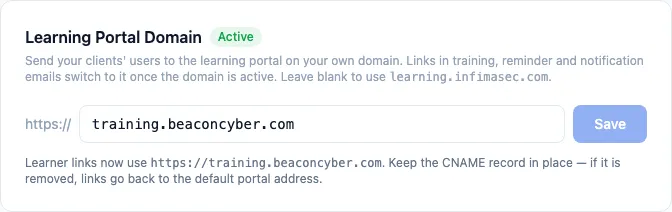
Done when the card says Active. From this point on, links in training emails and the portal itself use your hostname.
Give one client their own hostname
Section titled “Give one client their own hostname”Open the client → Tailor → Branding & Email. The same card is there; the steps are identical, except the DNS record is added under the client’s domain. Leave it blank and the client inherits your partner-wide hostname.
What changes once it’s active
Section titled “What changes once it’s active”- Emails — welcome emails, training invitations and reminders, manager reminders, policy reminders, breach notifications and sign-in links all point at the new hostname.
- Shared links — the links under Tailor → Share links use it too.
- The portal itself loads at the new address with the same branding you’ve already set. Users don’t need to do anything differently.
You’ll know it worked when
Section titled “You’ll know it worked when”- The card shows Active.
- Opening
https://training.yourcompany.comin a browser shows the learning portal sign-in page with your logo. - A test welcome email or training reminder to one of the client’s users links to the new hostname.
Frequently asked
Section titled “Frequently asked”How long does it take? DNS changes usually show up within minutes, though some providers take longer to propagate. Once the record is right, the certificate is normally issued and the domain connected within a few minutes. If the card is still on Waiting for DNS after an hour, re-check the record — the message under the record table says exactly what we found.
The card says my record points somewhere else, but I added it. The most common causes are an ALIAS record instead of a CNAME (some providers, including Route 53, offer both — pick CNAME), a proxied record, or a record added to the wrong zone. Fix the record and click I’ve added the record again.
Can I use my bare domain, like yourcompany.com?
No. A CNAME can only be added to a subdomain, so choose something like training.yourcompany.com or learn.yourcompany.com. The card will tell you if the name you enter isn’t usable.
What happens to Microsoft and Google sign-in?
It keeps working. When a user clicks Sign in with Microsoft or Sign in with Google on your hostname, they briefly pass through learning.infimasec.com to complete the sign-in, then land back on your hostname. Emailed sign-in links and email sign-in never leave your hostname.
If a client sets their own hostname, do I still see it? Yes — the client’s card shows their hostname and which one they’d inherit if they cleared it. Each hostname can only be used by one partner or client, so two clients can’t share one; they don’t need to, because they inherit yours.
What if the DNS record is removed later?
We keep checking after the domain is active. If the record disappears, the card changes to Not working and links go back to learning.infimasec.com so nothing goes out with a dead link. Restore the record and the domain becomes active again on the next check.
How do I stop using a custom hostname?
Clear the field and save. Links go back to learning.infimasec.com immediately (or to your partner-wide hostname, if you cleared a client’s). You can remove the DNS record whenever you like afterwards.
I entered a hostname and it says it’s already in use. Another partner or client on our platform already has that hostname, or it’s already attached to another web service. Choose a different subdomain.
Related
Section titled “Related”- Branding defaults and per-client overrides — the logo and sender identity that show on the portal at your hostname.
- Partner-level settings — where the partner-wide card lives.
- Learning Portal — what your clients’ users see once they’re there.